What equipment is needed for a podcast? Less than you think.
This is how I recommend everyone starts, whether you're a beginner hobbyist or launching a podcast for your business.
Here's why. Over and over again, I see people invest serious time and money into a podcast and never get past episode five. Sometimes they never even get past episode one. A podcast can look completely feasible on paper. You will never actually know if it is until you go and record.
So here's the honest answer, no scrolling required. You can start a podcast for under $100, and most of what you think you need, you don't.
A Samson Q2U microphone
This is the one I point almost every beginner toward. It's a USB mic, so it plugs straight into your laptop with no extra equipment needed, no interface, no separate booster, nothing else to buy or figure out. You can hold it in your hand, or pick up a cheap adjustable arm so it sits in front of you while you talk. That's the whole decision.
Think of it like learning guitar. If you were just starting out, would you go straight for the most expensive guitar on the wall? No, you'd choose something solid and affordable that lets you actually learn to play. The Q2U is that guitar. It'll genuinely last you forever if you need it to, and the option to upgrade is always there once you actually know what you'd be upgrading for.
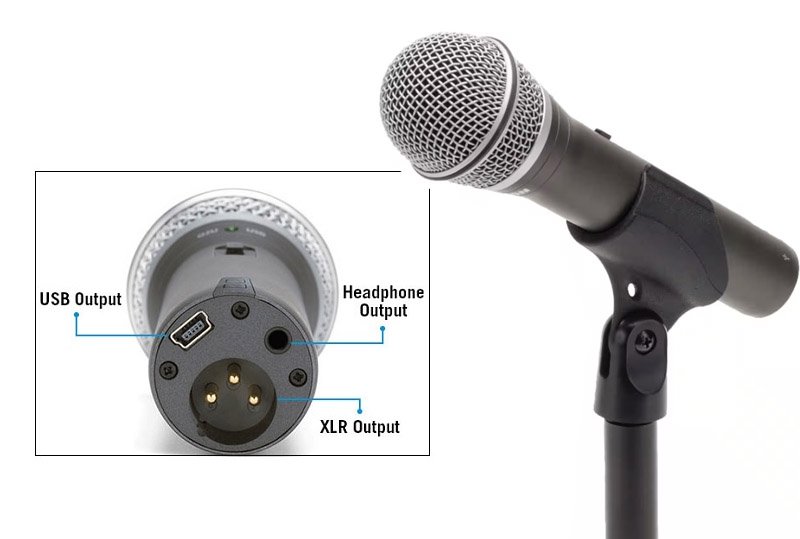
Both host and guest on this episode used the Samson Q2U. No studio, no interface, no fuss.
✕ Don't spend weeks comparing microphones before you've recorded a single episode.
✓ Do get the Q2U, plug it in, and start. You can always upgrade later once you know you're sticking with this.
Riverside to record
This is what I use with almost every client. It records locally in your browser, so the quality holds up even if your internet connection isn't great, and it works whether you're recording solo or bringing in a remote guest from anywhere in the world.
✕ Don't rely on a tool that records over a call connection, since dropouts and lag end up baked into your audio.
✓ Do use a local recording tool from day one. You can try Riverside here.
Transistor to host it
Once an episode is recorded and edited, it needs somewhere to actually live, the platform that pushes it out to Spotify, Apple Podcasts and everywhere else your audience listens. Transistor is the hosting platform I recommend to almost everyone I work with, simple to use and built for exactly this job. Upload your episode once, and it gets distributed everywhere automatically, no separate submission to Spotify, no separate submission to Apple, no chasing different platforms one by one. That's it, your show is live everywhere with a single click.
✕ Don't overthink hosting. It's infrastructure, not a creative decision.
✓ Do pick a platform built for podcasters specifically. Take a look at Transistor here.
Mic, recording platform, hosting. That's genuinely the whole list. Add it up and you're looking at under $100 to get a real episode out into the world.
A fancy studio
I see this constantly. Someone delays starting for months because they're trying to sort out a proper recording space first, treated walls, a desk setup, the works. The pressure of having to justify a setup like that becomes heavier than the podcast itself, and that pressure is exactly what makes people quit before they've published a single episode.
✕ Don't wait until you've built the perfect recording space.
✓ Do use a quiet room with a closed door. It gets you further than a studio you never finish building.
A fancy background
Same instinct, different form. People want a backdrop, good lighting, sometimes a blurred background to look more polished on camera. Don't do this. A blurred background creates instant distance, it says studio, says corporate, says you're not actually welcome into this space. Your real, unstaged background says more about who you are than any set dressing ever could.
✕ Don't blur your background to look more professional.
✓ Do leave it exactly as it is. Real beats staged, every time.
A Shure SM7B
This one comes up in almost every gear conversation because it's the mic you see in every big podcast setup online. It's a genuinely great microphone. It's also not where you start, because it needs an audio interface and usually a preamp booster to sound right, extra cost and extra complexity you don't need for episode one.
✕ Don't buy a mic that needs an interface and a booster before you've recorded anything.
✓ Do save the SM7B for later, once you know this is something you're sticking with.
A logo or branded cover art
This one is huge. People spend weeks on Fiverr or going back and forth with a designer trying to get the artwork perfect, before they've even proven the podcast itself is something they'll actually stick with. That's the wrong order. The cover art doesn't decide whether episode six gets made. You do.
The goal at the start is simple. Record five episodes. Use basic or AI generated cover art to get those episodes out the door. See how you get on, whether you're enjoying it, whether the format's working. Once you know that, you're in a much better position to decide what the right next step actually is, and a proper cover design becomes a sensible investment instead of a guess.
✕ Don't perfect your branding before you've proven the podcast to yourself.
✓ Do use something simple, even AI generated, for your first five episodes. Upgrade once you know what you're upgrading for.
Paid editing software
People often assume editing means a separate purchase, a subscription to something complicated, maybe even hiring it out before they've recorded a single word. You don't need any of that to start. Riverside has its own built in editor, and it's enough to trim, tidy and put together your first episodes without ever opening another piece of software.
Editing itself is also a much smaller job than people imagine. For most episodes it's removing a couple of dead spots, tightening the start and end, maybe pulling a clip for social. That's it. If you'd rather learn to do this properly yourself rather than pay someone every week to do it for you, I run training sessions specifically on this, so you walk away able to edit your own show with confidence.
✕ Don't buy or learn a separate editing tool before you've recorded anything.
✓ Do edit inside Riverside to start. If you want to get properly confident with editing, that's something I can teach you directly.
Mic, software, hosting, under $100, and none of the five things above. That's genuinely everything standing between you and a published episode this week.
If there's one thing to take from all of this, it's polish before proof. Every one of these mistakes comes from trying to look ready before you actually know if the podcast works. Record first. Prove it to yourself. Polish later, once you know what's actually worth polishing.

Want someone to walk you through it properly?
Bren Russell, Podlad
If you'd rather not figure all of this out alone, I run a 1:1 tailored session built specifically for hobbyists and small business owners who want to run their own podcast without ongoing production costs. Four sessions, spread out as you need them, covering your equipment, your setup, your format and your message, so you're not guessing at any of it.
It's a one time investment, not a retainer. You walk away knowing exactly what to do and why, able to run the whole thing yourself from there.
1:1 tailored sessions, €150 per session or €675 for four
Book your first session below, equipment, setup and the path that fits your podcast.
